Data Users
The Earthmover Marketplace makes it easy to discover and access high-value weather, climate, and Earth-observation datasets. As a data user, you can subscribe to datasets and start querying them immediately, no data pipelines or downloads required.
When you subscribe to a dataset, a read-only repo appears in your Arraylake organization. You can query it using Arraylake and Icechunk just like any other Arraylake repo. How the subscription works depends on whether you're subscribing to a free or paid listing. See Free Listings and Paid Listings below for details.
Subscriptions are not anonymous. When you subscribe to a dataset, the data provider can see your organization name and contact email.
Free Listings
Many datasets on the Marketplace are freely available. Anyone with an Arraylake account can subscribe to free listings instantly.
Free listings use direct subscriptions. Your repo is a complete mirror of the provider's repo: you see every update they publish and can access the full commit history.
Getting Started
- Browse the Marketplace — Find a dataset you're interested in at app.earthmover.io/marketplace
- Subscribe — Click the subscribe button on the listing page
- Select an Organization — Choose which Arraylake organization should house the resulting repo
- If you don't have an organization yet, you'll be prompted to create one
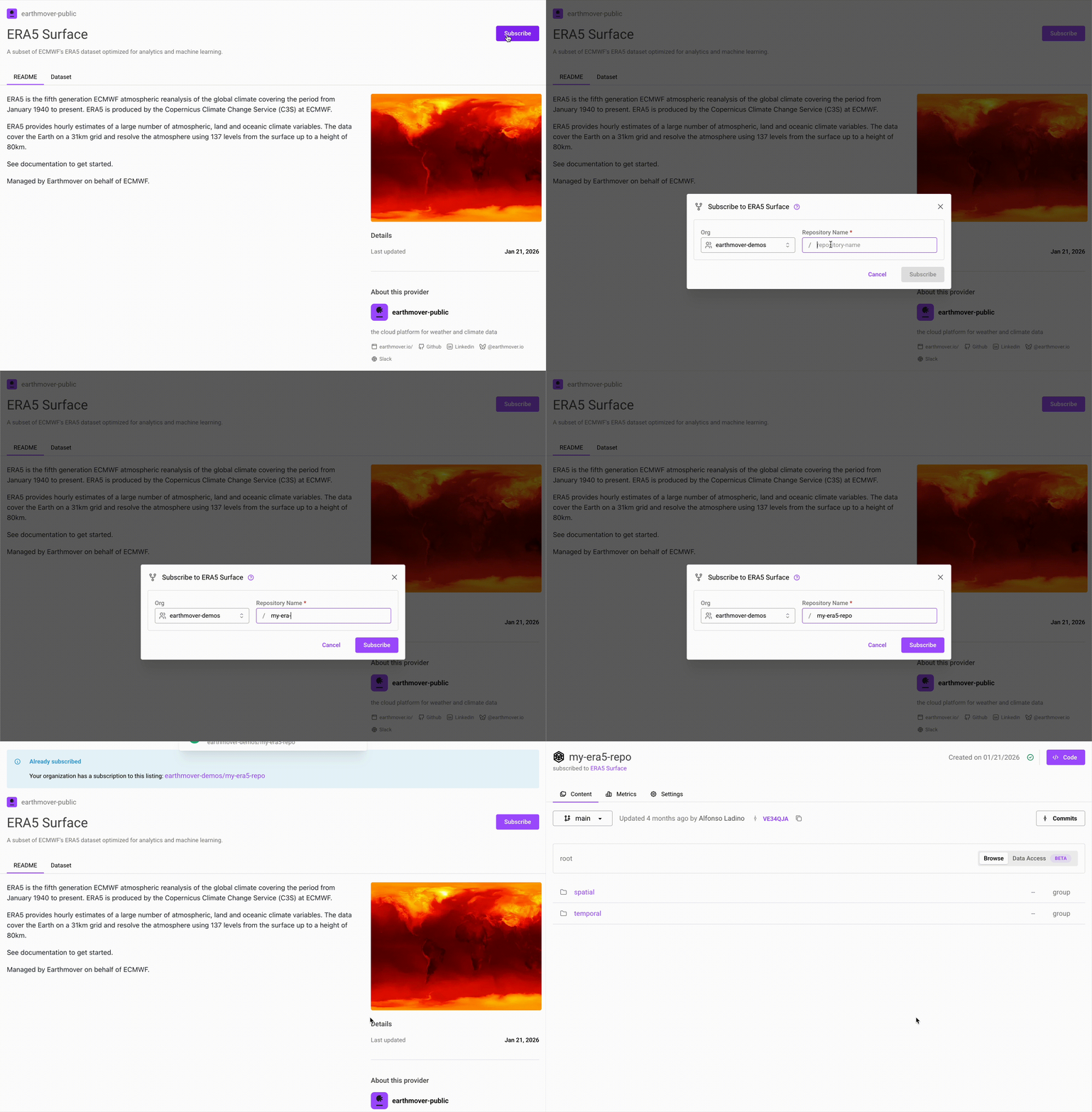
Only organizations that qualify appear in the picker, and if none of yours do, you'll be told so up front instead of being shown a form that can't be submitted.
Organizations created through self-service signup can read subscribed datasets but don't include the full feature set of a Professional plan. Contact our sales team to learn more about professional capabilities.
Querying Your Data
Interacting with Marketplace repos requires arraylake >= 0.26.1. You can check your version with arraylake --version and upgrade with pip install --upgrade arraylake.
Once subscribed, use Arraylake and Icechunk to query the data:
import arraylake as al
import icechunk
import xarray as xr

# Connect to your subscribed dataset
al_client = al.Client()
ic_repo = al_client.get_repo("your-org/subscribed-dataset")
session = ic_repo.readonly_session(branch = "main")

# Open with xarray
ds = xr.open_zarr(session.store, group="target-group")
For more details on working with Arraylake repos, including advanced querying techniques and data analysis workflows, see our Usage Guide.
Paid Listings
Some datasets on the Marketplace are premium offerings from third-party data providers. Earthmover facilitates access to these datasets but does not sell the data directly. You'll work with the data provider to set up your subscription.
Paid listings use filtered subscriptions. Instead of mirroring the provider's entire repo, you receive a repo scoped to specific variables, time ranges, or spatial regions. Your repo's metadata is stored in your organization's bucket, while the actual data is read from the provider's storage.
Behind the scenes, Subsync — Earthmover's replication engine — watches the provider's repo for new commits and rewrites just your subscribed slice into your repo. See Filtered Subscriptions: Fine-Grained Cloud-Native Data Sharing for more on how this keeps your data current without copying anything you didn't ask for.
What You Receive
The variables included in your subscription are determined by the data provider when they create your subscription. Providers can customize each subscription, so what you receive may differ from what's advertised in the listing or what other subscribers receive.
When the provider publishes updates to the underlying dataset, your subscription automatically receives updates, but only for the variables included in your subscription. If the provider adds new variables to the dataset, you won't see them unless your subscription is updated to include them.
If you need access to additional variables or a different subset of the data, contact the data provider directly.
Requesting Access
You must be logged into Arraylake to request access to paid listings.
- Find the listing — Browse to the dataset you're interested in
- Request access — Click the "Request Access" button on the listing page
- Finalize with the provider — You'll work directly with the data provider to agree on terms that fit your use case.
- Claim your subscription — Once terms are finalized, the data provider will send you a claim code. See Claiming a Subscription below.
Claiming a Subscription
Once a data provider has created a subscription for you, they'll share a claim code. To claim your subscription:
- Go to app.earthmover.io/marketplace/claim
- Enter your claim code
- Review the subscription details set by the data provider
- Select which organization should house the resulting repo
- Select a storage bucket for the repo's metadata (see note below)
- Confirm to create the subscribed repo in your organization
Your new repo will appear in your organization with read-only access to the variables included in your subscription. You can query this repo using the same code shown in Querying Your Data above. The experience is identical whether you're working with a free or paid subscription.
Filtered subscriptions store your repo's metadata in your organization's storage, while the actual chunk data is read from the provider's storage. This is different from free listings, which point directly to the provider's repo and don't require any storage on your end.