Data Providers
As a verified data provider partner, you can share and monetize your datasets through the Earthmover Marketplace. List free datasets to make your data more accessible to the community, or offer paid subscriptions on your own terms.
Your data lives in Icechunk repositories within your Arraylake organization. When you create a listing, subscribers from other organizations can discover your dataset on the Marketplace and subscribe to access it, including any updates you publish.
Becoming a Data Provider
Becoming a data provider is quick and easy.
- Head to https://app.earthmover.io/orgs/new to create a new organization (if you don't already have one). This organization will be the public face for your data, so make sure to create a good profile!
- Upgrade your account to a professional tier plan by emailing support@earthmover.io.
- Add users to your organization.
- Configure a storage bucket using Credential Vending in your cloud provider of choice. If you need Earthmover-managed storage for your dataset, please contact support for assistance.
- Create a repo to hold your data.
- If you already have existing Icechunk data, you can import it directly.
- Or you can write a new Icechunk dataset using Xarray.
Once your data has been ingested, you're ready to create a Marketplace listing!
We encourage you to join our Slack to obtain support from the Earthmover team.
Managing Listings
Listings are how you expose your data to the Marketplace. You can create, edit, and publish listings from Publish → Listings in your organization settings.
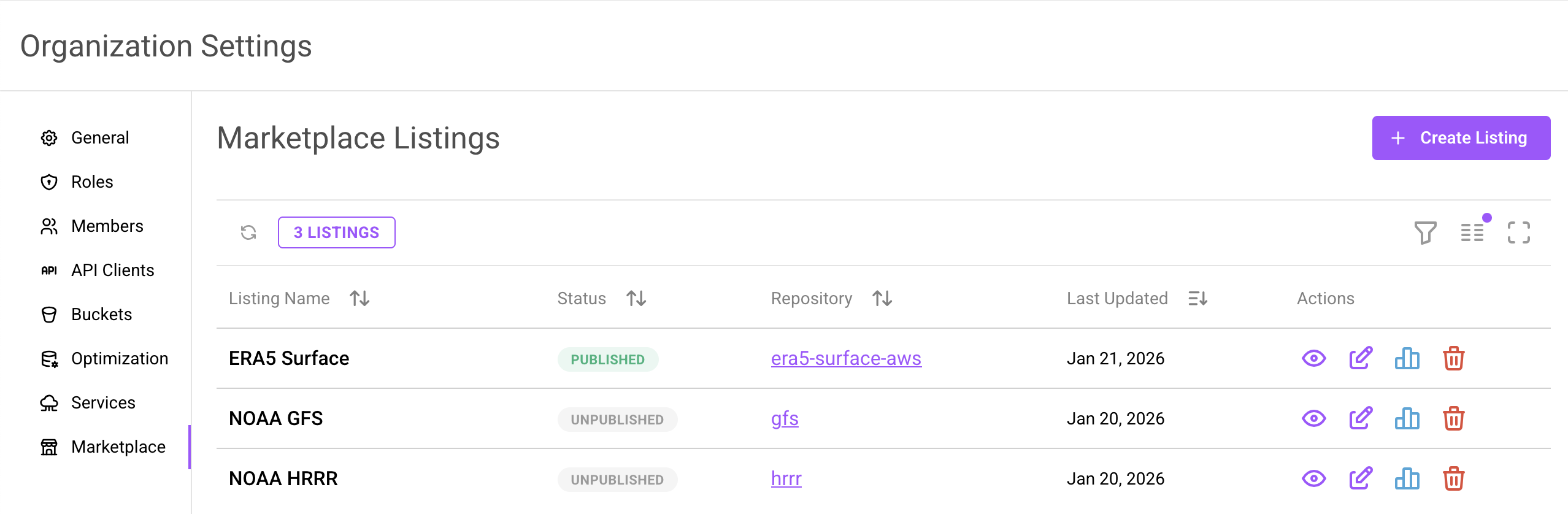
Creating a Listing
To create a new listing:
- Navigate to Publish → Listings in your organization settings
- Click New Listing
- Fill in the listing details:
| Field | Description |
|---|---|
| Exchange | The catalog the listing appears in. Defaults to the Earthmover Marketplace; other exchanges your organization can post to also appear here. See Publishing to an Exchange. |
| Repository | Select the repo you want to list. You can leave this blank initially and add it later when you're ready to make the data available. |
| Listing Name | A clear, descriptive name for your dataset. |
| Description | A brief summary that appears in Marketplace search results. |
| Thumbnail URL | An image URL to visually represent your dataset. These thumbnails are prominently displayed in the Marketplace. |
| Status | Choose from Private, Coming Soon, or Published. See Listing Status below for details. |
| Pricing Model | Shown only for listings on the Earthmover Marketplace. Choose Free or Paid. Free datasets can be subscribed to instantly by anyone with an Arraylake account. Paid datasets require you to finalize terms with each subscriber before they gain access. See Choosing What to Include below. |
| README Content | Detailed documentation for your dataset. Click "Use Template" for a starting point. Include variables, coordinates, update frequency, and anything that helps users work with the data. |
| License | Define what subscribers can do with your data. You can select a Creative Commons license, link out to an existing license, or add custom terms. |
Choosing What to Include
The pricing model you choose determines how much control you have over what's included in the listing:
Free listings include all variables and groups from your repository. Subscribers get access to everything in the repo.
Paid listings let you select exactly which variables and groups are available to subscribers. This is useful when:
- You want to offer a subset of your data as a distinct product
- Your repo contains internal or experimental groups that shouldn't be exposed
- You want to create multiple listings from the same repo, each with different variables
When you select a paid pricing model, you'll be able to choose which groups and variables to include. Only the data you select will be visible to subscribers; everything else remains private to your organization.
Either way, the form's Define What's Included section shows the groups and variables the listing exposes, so you can confirm the scope before you publish. Listings on an exchange other than the Marketplace have no pricing choice and share the whole repository, so for those the summary is a confirmation rather than a selection.
If you add new variables to your dataset after creating a listing, you can update the listing to include them. This makes the new data available to future subscribers. You cannot remove variables that are already part of active subscriptions.
Listing Status
Your listing can have one of three statuses:
| Status | Visibility | Description |
|---|---|---|
| Private | Only your organization | Use this while drafting, or to sell data without listing it publicly. Your listing won't appear in the Marketplace, letting you preview and iterate before going public — or skip going public entirely. See Private listings. |
| Coming Soon | Public | Use this to announce upcoming datasets before they're ready. The listing appears in the Marketplace with a "Coming Soon" badge, and potential users can register their interest to be notified when it becomes available. |
| Published | Public | Your listing is live and users can subscribe to access the data. Requires a repository to be attached. |
Publishing requires an Icechunk 2 repository, so if your repo is still on Icechunk 1, migrate it from the repository's settings page before publishing — you can keep the listing as a private draft in the meantime.
Once you're happy with your listing, set the status to Published to make it live on the Marketplace!
Deleting a Listing
Deleting is provider self-service and stays available to you even after an exchange's owner organization removes your organization's posting membership. Editing a listing that was kept on the exchange requires being re-invited as a posting member; deleting it does not. See If Your Membership Is Revoked.
Deleting listings is also what unblocks deleting an exchange: an exchange cannot be deleted while any listing still references it.
How Subscriptions Work
When someone subscribes to your listing, a read-only repo appears in their organization that gives them access to your data. The Marketplace supports two types of subscriptions, each designed for different use cases.
Direct Subscriptions
Direct subscriptions are used for free listings. Subscribers access your repository directly and receive every update you publish. Their repo is a complete mirror of yours: when you commit new data, subscribers see it immediately.
With direct subscriptions:
- Subscribers read data directly from your object store
- Subscribers see your full commit history and can access any version
- No data is copied; the subscriber's repo points to your storage
Filtered Subscriptions
Filtered subscriptions are used for paid listings. Instead of mirroring your entire repo, subscribers receive a repo scoped to specific variables, time ranges, or spatial regions defined by your listing. This lets you offer tailored data products from a single source repository.
With filtered subscriptions:
- Subscribers have their own repo with metadata stored in their organization's bucket
- The actual chunk data is read from your object store (no data is copied)
- Subscribers only receive updates for the data within their subscription scope
Filtered subscriptions are kept in sync by Subsync, Earthmover's replication engine: it watches your repo for new commits and republishes just the subscribed slice of each update into every subscriber's repo, in minutes. For a deeper look at how this works, see Filtered Subscriptions: Fine-Grained Cloud-Native Data Sharing.
Filtered subscriptions do not yet support virtual chunks, Azure-hosted data, or buckets using HMAC credentials.
Materialized subscriptions (coming soon) will automatically copy all the data (including chunks) to the subscriber's object store. This is useful for subscribers who want the data in a specific bucket for performance or compliance purposes.
Data Access Authorization
By attaching a repository to a marketplace listing, you authorize subscribers to read data from your object storage. In both subscription types, subscribers can only read data, never list, write, or delete. Access is limited to the paths defined by your listing. Due to Icechunk's cryptographically random keys, it is not possible for the subscriber to discover any data not explicitly included in their manifests.
Managing Subscriptions
How users subscribe to your listings depends on your pricing model:
Free listings — Anyone with an Arraylake account can subscribe instantly from the Marketplace. No action required on your part. These create direct subscriptions.
Paid listings — You control who can subscribe by creating subscriptions manually. This lets you finalize terms with each customer before granting access. These create filtered subscriptions.
To create a subscription for a paid listing:
- Navigate to Publish → Subscriptions in your organization settings
- Click New Subscription
- Fill in the subscription details:
| Field | Description |
|---|---|
| Listing | Select which listing to create a subscription for. |
| Variables | Choose which variables to include in this subscription. See Customizing subscriptions below. |
| Pricing | How the subscriber will be charged. |
| Claim Code Expiration | How long the subscriber has to claim this subscription. |
| Description | Add context to this claim, such as who it is for. This is for your internal tracking. |
- Click Create to generate a claim code
Once created, you'll receive a unique claim code and a unique link. Share this code or link with your intended subscriber so they can claim their subscription. When they claim the code, a read-only repo will be created in their organization with access to their subscription's data.
Customizing subscriptions
When creating a subscription, you can choose exactly which variables the subscriber receives. The available options are limited to what you've already included in the listing. You can offer a subset of the listing, but you can't add variables that aren't part of the listing.
This lets you create different subscription tiers from a single listing. For example, you might offer:
- A basic subscription with core forecast variables for one subscriber
- A premium subscription with additional derived products or higher-resolution data for a different subscriber
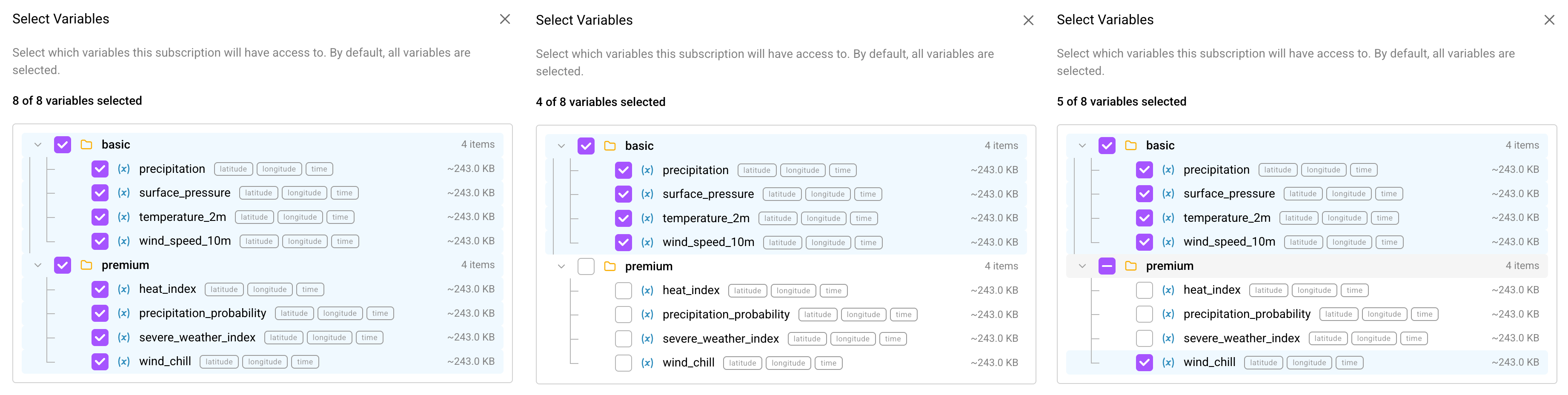 Different subscriptions from the same listing can include different subsets of variables.
Each subscriber only sees and pays for the data they are subscribed to.
Private Listings
Not every dataset needs to be on the public Marketplace. A listing left in Private status is visible only to your organization, but you can still create subscriptions against it. This lets you share or sell data with specific customers without ever advertising the dataset publicly.
To set up a private subscription:
- Create a listing for your repo and leave the status set to Private. The listing must have a repository attached.
- Set the pricing model to Paid and choose which variables and groups to include.
- Follow the subscription flow above to create a subscription and generate a claim code.
- Share the claim code or link with your intended subscriber.
Your subscriber claims the code exactly as they would for a public paid listing, and a read-only repo appears in their organization. Neither the listing nor the subscription is ever exposed on the Marketplace.
Private subscriptions require a paid listing, which creates a filtered subscription. Free listings use direct subscriptions, which subscribers initiate themselves from the Marketplace — so a free listing must be Published before anyone can subscribe to it.
You can make a private listing public at any time by changing its status to Published. Existing subscriptions are unaffected.
Egress Considerations
Since subscribers read subscribed data directly from your object store bucket, you may incur egress costs when they access your data. To minimize these costs, we recommend hosting your data on storage with free or reduced egress pricing:
- Cloudflare R2 — No egress fees
- AWS Open Data Sponsorship Program — AWS covers storage and egress costs for qualifying public datasets
Keep this in mind for free, public datasets as read access is unbounded.
Listing Metrics
Each listing includes metrics so you can understand how your data is being used. From the listing details page, you can view:
- Total subscriptions — How many organizations have subscribed
- Total access — Aggregate read activity across all subscribers
- Unique viewers — Number of distinct users accessing your data
- Subscribed organizations — A list of organizations currently subscribed to your dataset
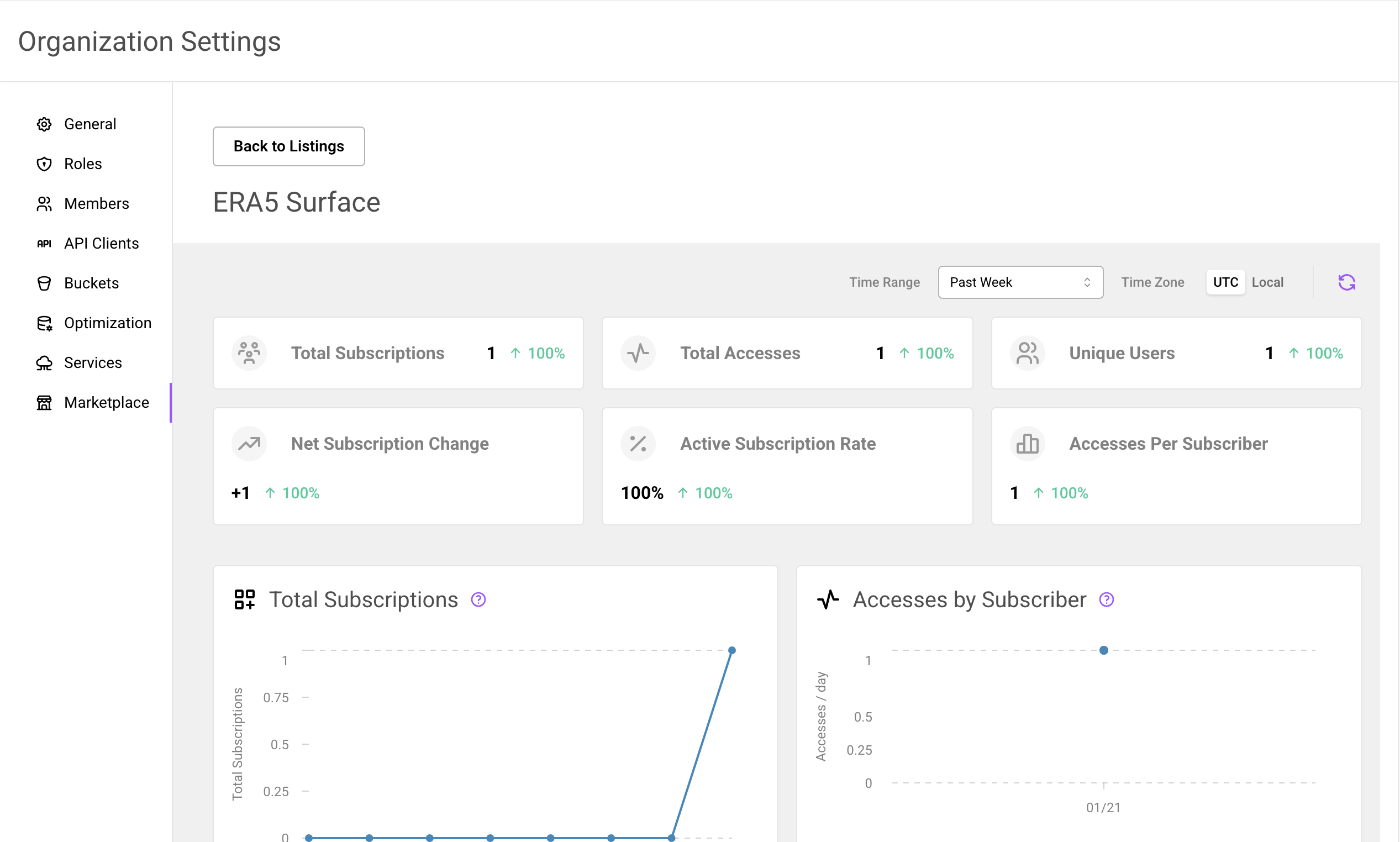
You can also view aggregated metrics across all your listings on your organization dashboard. These metrics help you understand the reach and impact of your data.